
Reusable skills
Build a flow once, name it, and drop it into any macro from a searchable picker.
Video walkthrough on the way
This topic's video is in production. The written guide below covers everything for now.
A skill is a saved piece of detection flow, a few steps and their transitions, that you can insert into any other flow. Build "find and click the OK button" once, and every macro that needs it gets the same tested steps.
Save a flow as a skill
- Build the stepsAuthor the flow in the graph editor as usual.
- Save itChoose Save flow as skill…, give it a name, and it lands in your skill library.
Insert a skill
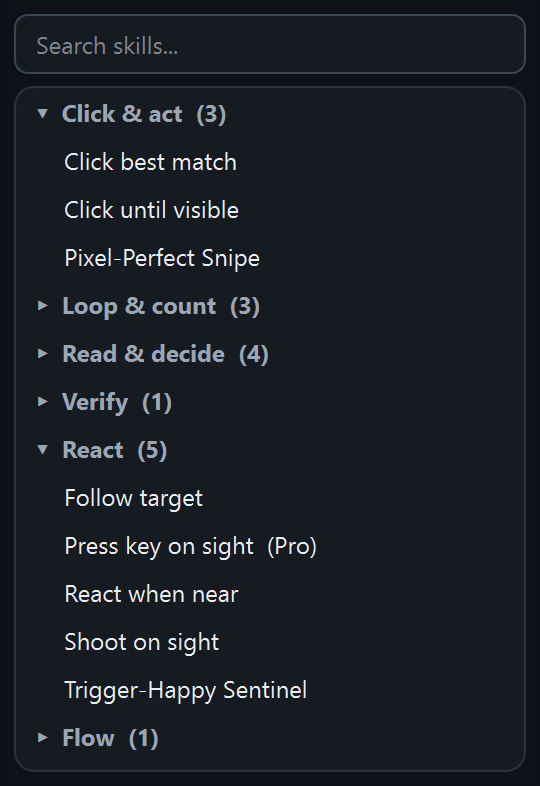
Insert skill… opens the skill picker: type to search, browse by category, and pick. Skills that need Pro at run time say (Pro) right in the list. If a skill takes inputs (an image, a key, a count), a short form asks for them, with Browse and Capture buttons on image fields so you can grab the target on the spot. The steps then drop into your current flow, ready to wire into your transitions.
Rename, categorize, delete
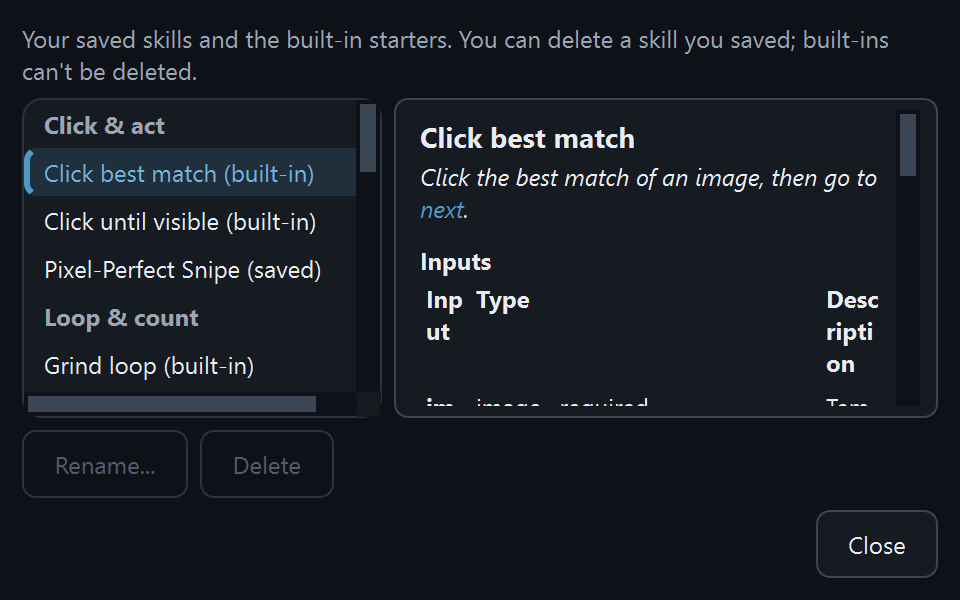
Manage skills… opens the library manager: rename a skill, move it between categories, preview its steps, or delete it. Renaming onto a starter skill's name overrides the built-in, so you can tweak a starter and keep its name.
The starter skills
QHuman ships with a library of starter recipes, common patterns like Click best match, Wait for image, and Follow target, so a new flow doesn't have to begin from a blank canvas. Starters can't be deleted (they live in the app, not on disk), but saving your own skill under the same name shadows them with your version.
Stuck on a step?
Ask in the Discord, post on r/QHuman, or email support. Happy to help.