
Editing recorded actions
Refine every captured action in the right-pane editor. No need to re-record.
Video walkthrough on the way
This topic's video is in production. The written guide below covers everything for now.
A recording isn't locked in. QHuman's editor lets you tune any action (position, button, delays) and reorder, rename, or drop the parts you don't want.
Read the action table
Each row in the action table is one recorded action: index, time, type (click, move, key, text, scroll), and a detail column with the specifics. Select a sub-sequence in the list above to load its actions here.
Edit one action
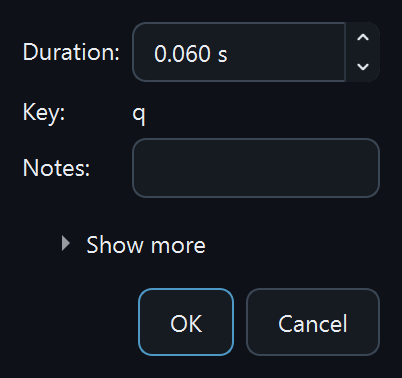
Double-click any row to open the Action Edit dialog. Common fields are visible by default: position, button, duration. Hit Show more for the advanced tier: mouse offset, replay count, ignore position, and ignore duration.
Edit multiple actions at once
Select several rows, right-click Edit…, and the multi-edit dialog opens. Per-field checkboxes gate the bulk apply, so only what you tick gets changed across the selection. Useful for shifting a batch of clicks by an offset, or normalising delays.
Reorder sequences
Drag a row in the Sequences list to move it. Each recorded sequence plays top to bottom, so reordering them reorders the routine, no re-recording needed. (Rows inside the action table itself can't be dragged; to change one action, edit or delete it.)
Delete an action vs delete the macro
The Delete button (or Del) is scope-aware. With a row focused in the action table, it removes that action from the editor only. With a macro focused in the left list, it deletes the saved macro from disk. The History dialog recovers either if needed.
Rename a sub-sequence
Double-click a sub-sequence's name in the Sequences list to rename it inline. Defaults like sequence_1, sequence_2 become whatever describes the step.
Add notes to a sub-sequence
The Notes field next to the action table saves free-form text with the sub-sequence. Handy for documenting what the recording does, what app it targets, or any quirks that future-you will forget.
Choose which sub-sequences are saved
Each row in the Sequences list has a checkbox. Only the checked rows are written into the saved macro bundle, so uncheck a sub-sequence to exclude it without deleting it from the editor.
Stuck on a step?
Ask in the Discord, post on r/QHuman, or email support. Happy to help.